
前言
上一节说了如何使用java读取excel里面的图片,一个同事说没必要这么麻烦,他说不用任何开发工具都可以获取到excel里面的图片。我表示不信的样子,他说让一下,让我秀一波操作给你看看
EXCEL的底层实现
修改后缀名为zip

解压zip

docProps目录

core.xml文件
<?xml version="1.0" encoding="UTF-8" standalone="yes"?>
<cp:coreProperties xmlns:cp="http://schemas.openxmlformats.org/package/2006/metadata/core-properties"
                   xmlns:dc="http://purl.org/dc/elements/1.1/" xmlns:dcterms="http://purl.org/dc/terms/"
                   xmlns:dcmitype="http://purl.org/dc/dcmitype/" xmlns:xsi="http://www.w3.org/2001/XMLSchema-instance">
    <!-- 创建人 -->
 <dc:creator>Administrator</dc:creator> <!-- 最后修改人 --> <cp:lastModifiedBy>Administrator</cp:lastModifiedBy> <!-- 创建时间 --> <dcterms:created xsi:type="dcterms:W3CDTF">2015-06-05T18:19:34Z</dcterms:created> <!-- 修改时间 --> <dcterms:modified xsi:type="dcterms:W3CDTF">2020-07-16T05:33:13Z</dcterms:modified> </cp:coreProperties>
app.xml文件
<?xml version="1.0" encoding="UTF-8" standalone="yes"?>
<Properties xmlns="http://schemas.openxmlformats.org/officeDocument/2006/extended-properties"
            xmlns:vt="http://schemas.openxmlformats.org/officeDocument/2006/docPropsVTypes">
    <!-- 文档类型 -->
    <Application>Microsoft Excel</Application>
 <!-- 是否加密 --> <DocSecurity>0</DocSecurity> <ScaleCrop>false</ScaleCrop> <HeadingPairs> <vt:vector size="2" baseType="variant"> <vt:variant> <vt:lpstr>工作表</vt:lpstr> </vt:variant> <vt:variant> <vt:i4>1</vt:i4> </vt:variant> </vt:vector> </HeadingPairs> <TitlesOfParts> <vt:vector size="1" baseType="lpstr"> <vt:lpstr>Sheet1</vt:lpstr> </vt:vector> </TitlesOfParts> <Company></Company> <LinksUpToDate>false</LinksUpToDate> <!-- 是否共享 --> <SharedDoc>false</SharedDoc> <HyperlinksChanged>false</HyperlinksChanged> <!-- 版本 --> <AppVersion>16.0300</AppVersion> </Properties>
xl目录,该目录保存的就是excel中的详细内容了
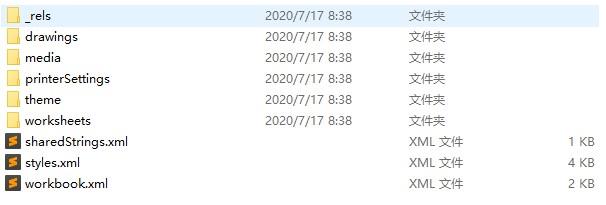
workbook.xml文件
文件包含一对标签,其中的每个元素都代表Excel 2007文件中的一个sheet,工作表的名称就是其name属性的值,这里有三个sheet
<?xml version="1.0" encoding="UTF-8" standalone="yes"?>
<workbook xmlns="http://schemas.openxmlformats.org/spreadsheetml/2006/main"
          xmlns:r="http://schemas.openxmlformats.org/officeDocument/2006/relationships"
          xmlns:mc="http://schemas.openxmlformats.org/markup-compatibility/2006" mc:Ignorable="x15 xr xr6 xr10 xr2"
 xmlns:x15="http://schemas.microsoft.com/office/spreadsheetml/2010/11/main" xmlns:xr="http://schemas.microsoft.com/office/spreadsheetml/2014/revision" xmlns:xr6="http://schemas.microsoft.com/office/spreadsheetml/2016/revision6" xmlns:xr10="http://schemas.microsoft.com/office/spreadsheetml/2016/revision10" xmlns:xr2="http://schemas.microsoft.com/office/spreadsheetml/2015/revision2"> <fileVersion appName="xl" lastEdited="7" lowestEdited="6" rupBuild="23001"/> <workbookPr/> <mc:AlternateContent xmlns:mc="http://schemas.openxmlformats.org/markup-compatibility/2006"> <mc:Choice Requires="x15"> <x15ac:absPath url="F:\open-code\testexcel\src\main\resources\" xmlns:x15ac="http://schemas.microsoft.com/office/spreadsheetml/2010/11/ac"/> </mc:Choice> </mc:AlternateContent> <xr:revisionPtr revIDLastSave="0" documentId="13_ncr:1_{99FEB8DB-ADF1-4FF3-A776-6F67AE8FB664}" xr6:coauthVersionLast="45" xr6:coauthVersionMax="45" xr10:uidLastSave="{00000000-0000-0000-0000-000000000000}"/> <bookViews> <workbookView xWindow="0" yWindow="1260" windowWidth="28800" windowHeight="14520" xr2:uid="{00000000-000D-0000-FFFF-FFFF00000000}"/> </bookViews> <sheets> <sheet name="Sheet1" sheetId="1" r:id="rId1"/> </sheets> <calcPr calcId="162913"/> <extLst> <ext uri="{140A7094-0E35-4892-8432-C4D2E57EDEB5}" xmlns:x15="http://schemas.microsoft.com/office/spreadsheetml/2010/11/main"> <x15:workbookPr chartTrackingRefBase="1"/> </ext> </extLst> </workbook>
_rels/workbook.xml.rels
定义每个sheetid对应的sheet内容文件sheet1.xml,共享的单元格内容文件sharedstring.xml,样式文件style.xml是当前单元格的样式字体,颜色等样式的xml配置。
<?xml version="1.0" encoding="UTF-8" standalone="yes"?>
<Relationships xmlns="http://schemas.openxmlformats.org/package/2006/relationships">
    <Relationship Id="rId3" Type="http://schemas.openxmlformats.org/officeDocument/2006/relationships/styles"
                  Target="styles.xml"/>
    <Relationship Id="rId2" Type="http://schemas.openxmlformats.org/officeDocument/2006/relationships/theme" Target="theme/theme1.xml"/> <Relationship Id="rId1" Type="http://schemas.openxmlformats.org/officeDocument/2006/relationships/worksheet" Target="worksheets/sheet1.xml"/> <Relationship Id="rId4" Type="http://schemas.openxmlformats.org/officeDocument/2006/relationships/sharedStrings" Target="sharedStrings.xml"/> </Relationships>
worksheets文件夹,保存的就是excel中的sheet

sheet.xml文件
<?xml version="1.0" encoding="UTF-8" standalone="yes"?>
<worksheet xmlns="http://schemas.openxmlformats.org/spreadsheetml/2006/main"
           xmlns:r="http://schemas.openxmlformats.org/officeDocument/2006/relationships"
           xmlns:mc="http://schemas.openxmlformats.org/markup-compatibility/2006" mc:Ignorable="x14ac xr xr2 xr3"
 xmlns:x14ac="http://schemas.microsoft.com/office/spreadsheetml/2009/9/ac" xmlns:xr="http://schemas.microsoft.com/office/spreadsheetml/2014/revision" xmlns:xr2="http://schemas.microsoft.com/office/spreadsheetml/2015/revision2" xmlns:xr3="http://schemas.microsoft.com/office/spreadsheetml/2016/revision3" xr:uid="{00000000-0001-0000-0000-000000000000}"> <!-- 容积,即该sheet中以供占用了多大的地方,哪个单元格到哪个单元格,矩形的左上角单元格和右下角单元格 此属性可以判断列数,如下就是:(M-A+1) --> <dimension ref="A1"/> <!-- sheet视图的配置信息,如打开时默认选中的单元格是哪个 --> <sheetViews> <sheetView tabSelected="1" workbookViewId="0"> <selection activeCell="C1" sqref="C1"/> </sheetView> </sheetViews> <!-- sheet的格式参数 --> <sheetFormatPr defaultRowHeight="14.25" x14ac:dyDescent="0.2"/> <!-- 数据区域,这个里面就是我们的单元格的相关数据信息了,是以行(Row)的方式记录的 --> <sheetData> <!-- excel中的行 --> <row r="1" spans="1:1" ht="77.25" customHeight="1" x14ac:dyDescent="0.2"> <!-- excel中的列 r:单元格坐标 s:单元格的style,对应style.xml中cellXfs元素下的某个元素xf元素, 此处就是对应索引为12的元素,从0开始计算,即为第13个xf元素。 t:元素类型,s表示是字符串类型,对应到sharedStrings.xml中的sst元素 --> <c r="A1" t="s"> <!-- 如果是t="s" 则存储的是sharedStrings.xml中sst元素下的某个si元素,此处对应索引为0的元素,即第一个si元素 否则,这里存储的就是单元格的值 --> <v>0</v> </c> </row> </sheetData> <phoneticPr fontId="1" type="noConversion"/> <!-- 页的相关属性设置 --> <pageMargins left="0.7" right="0.7" top="0.75" bottom="0.75" header="0.3" footer="0.3"/> <!-- 分页设置 --> <pageSetup paperSize="9" orientation="portrait" r:id="rId1"/> <!-- 图形信息,由图可以看出,这里引用了draw的文档了--> <drawing r:id="rId2"/> </worksheet>
worksheets/_rels
<?xml version="1.0" encoding="UTF-8" standalone="yes"?>
<Relationships xmlns="http://schemas.openxmlformats.org/package/2006/relationships">
    <!--图像drawing.xml-->
    <Relationship Id="rId2" Type="http://schemas.openxmlformats.org/officeDocument/2006/relationships/drawing"
 Target="../drawings/drawing1.xml"/>
 <Relationship Id="rId1" Type="http://schemas.openxmlformats.org/officeDocument/2006/relationships/printerSettings" Target="../printerSettings/printerSettings1.bin"/> </Relationships>
drawing.xml
<?xml version="1.0" encoding="UTF-8" standalone="yes"?>
<xdr:wsDr xmlns:xdr="http://schemas.openxmlformats.org/drawingml/2006/spreadsheetDrawing"
          xmlns:a="http://schemas.openxmlformats.org/drawingml/2006/main">
    <!--xdr:twoCellAnchor表示了确定图片位置的方式-->
    <xdr:twoCellAnchor editAs="oneCell">
 <xdr:from> <xdr:col>1</xdr:col> <xdr:colOff>104775</xdr:colOff> <xdr:row>0</xdr:row> <xdr:rowOff>310091</xdr:rowOff> </xdr:from> <xdr:to> <xdr:col>1</xdr:col> <xdr:colOff>637475</xdr:colOff> <xdr:row>0</xdr:row> <xdr:rowOff>852773</xdr:rowOff> </xdr:to> <xdr:pic> <xdr:nvPicPr> <xdr:cNvPr id="2" name="图片 1"> <a:extLst> <a:ext uri="{FF2B5EF4-FFF2-40B4-BE49-F238E27FC236}"> <a16:creationId xmlns:a16="http://schemas.microsoft.com/office/drawing/2014/main" id="{2247CA96-B3D7-4979-9626-625EE84E07CA}"/> </a:ext> </a:extLst> </xdr:cNvPr> <xdr:cNvPicPr> <a:picLocks noChangeAspect="1"/> </xdr:cNvPicPr> </xdr:nvPicPr> <xdr:blipFill> <a:blip xmlns:r="http://schemas.openxmlformats.org/officeDocument/2006/relationships" r:embed="rId1"/> <a:stretch> <a:fillRect/> </a:stretch> </xdr:blipFill> <xdr:spPr> <a:xfrm> <a:off x="790575" y="310091"/> <a:ext cx="532700" cy="542682"/> </a:xfrm> <a:prstGeom prst="rect"> <a:avLst/> </a:prstGeom> </xdr:spPr> </xdr:pic> <xdr:clientData/> </xdr:twoCellAnchor> </xdr:wsDr>
xl/media 媒体文件目录,这里就是图片的位置了
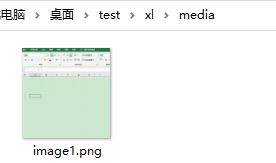 image-20200717093104802
styles.xml文件
<?xml version="1.0" encoding="UTF-8" standalone="yes"?>
<styleSheet xmlns="http://schemas.openxmlformats.org/spreadsheetml/2006/main"
            xmlns:mc="http://schemas.openxmlformats.org/markup-compatibility/2006" mc:Ignorable="x14ac x16r2 xr"
            xmlns:x14ac="http://schemas.microsoft.com/office/spreadsheetml/2009/9/ac"
 xmlns:x16r2="http://schemas.microsoft.com/office/spreadsheetml/2015/02/main" xmlns:xr="http://schemas.microsoft.com/office/spreadsheetml/2014/revision"> <!-- 字体样式 --> <fonts count="2" x14ac:knownFonts="1"> <font> <sz val="11"/> <color theme="1"/> <name val="等线"/> <family val="2"/> <scheme val="minor"/> </font> <font> <sz val="9"/> <name val="等线"/> <family val="3"/> <charset val="134"/> <scheme val="minor"/> </font> </fonts> <!-- 填充样式,包括背景色 --> <fills count="2"> <fill> <patternFill patternType="none"/> </fill> <fill> <patternFill patternType="gray125"/> </fill> </fills> <!-- 边框 --> <borders count="1"> <border> <left/> <right/> <top/> <bottom/> <diagonal/> </border> </borders> <!-- 提供给cellXfs来调用 --> <cellStyleXfs count="1"> <xf numFmtId="0" fontId="0" fillId="0" borderId="0"/> </cellStyleXfs> <!-- 真正的样式定义 --> <cellXfs count="1"> <!-- 此处的numFmtId和cellStyleXfs、numFmts等中的numFmtId对应 --> <!-- sheet.xml中的c(列)元素属性中s的属性值都对应这里一个xf元素,s的属性值存储的就是xf的索引--> <xf numFmtId="0" fontId="0" fillId="0" borderId="0" xfId="0"/> </cellXfs> <cellStyles count="1"> <cellStyle name="常规" xfId="0" builtinId="0"/> </cellStyles> <dxfs count="0"/> <tableStyles count="0" defaultTableStyle="TableStyleMedium2" defaultPivotStyle="PivotStyleLight16"/> <colors> <!--颜色索引--> <indexedColors> <rgbColor rgb="00000000"/> <rgbColor rgb="00FFFFFF"/> <rgbColor rgb="00FF0000"/> <rgbColor rgb="0000FF00"/> <rgbColor rgb="000000FF"/> <rgbColor rgb="00FFFF00"/> <rgbColor rgb="00FF00FF"/> <rgbColor rgb="0000FFFF"/> <rgbColor rgb="00000000"/> <rgbColor rgb="00FFFFFF"/> <rgbColor rgb="00FF0000"/> <rgbColor rgb="0000FF00"/> <rgbColor rgb="000000FF"/> <rgbColor rgb="00FFFF00"/> <rgbColor rgb="00FF00FF"/> <rgbColor rgb="0000FFFF"/> <rgbColor rgb="00800000"/> <rgbColor rgb="00008000"/> <rgbColor rgb="00000080"/> <rgbColor rgb="00808000"/> <rgbColor rgb="00800080"/> <rgbColor rgb="00008080"/> <rgbColor rgb="00C0C0C0"/> <rgbColor rgb="00808080"/> <rgbColor rgb="009999FF"/> <rgbColor rgb="00993366"/> <rgbColor rgb="00FFFFCC"/> <rgbColor rgb="00CCFFFF"/> <rgbColor rgb="00660066"/> <rgbColor rgb="00FF8080"/> <rgbColor rgb="000066CC"/> <rgbColor rgb="00CCCCFF"/> <rgbColor rgb="00000080"/> <rgbColor rgb="00FF00FF"/> <rgbColor rgb="00FFFF00"/> <rgbColor rgb="0000FFFF"/> <rgbColor rgb="00800080"/> <rgbColor rgb="00800000"/> <rgbColor rgb="00008080"/> <rgbColor rgb="000000FF"/> <rgbColor rgb="0000CCFF"/> <rgbColor rgb="00CCFFFF"/> <rgbColor rgb="00CCFFCC"/> <rgbColor rgb="00FFFF99"/> <rgbColor rgb="0099CCFF"/> <rgbColor rgb="00FF99CC"/> <rgbColor rgb="00CC99FF"/> <rgbColor rgb="00FFCC99"/> <rgbColor rgb="003366FF"/> <rgbColor rgb="0033CCCC"/> <rgbColor rgb="0099CC00"/> <rgbColor rgb="00FFCC00"/> <rgbColor rgb="00FF9900"/> <rgbColor rgb="00FF6600"/> <rgbColor rgb="00666699"/> <rgbColor rgb="00969696"/> <rgbColor rgb="00003366"/> <rgbColor rgb="00339966"/> <rgbColor rgb="00003300"/> <rgbColor rgb="00333300"/> <rgbColor rgb="00993300"/> <rgbColor rgb="00993366"/> <rgbColor rgb="00333399"/> <rgbColor rgb="00333333"/> </indexedColors> </colors> <extLst> <ext uri="{EB79DEF2-80B8-43e5-95BD-54CBDDF9020C}" xmlns:x14="http://schemas.microsoft.com/office/spreadsheetml/2009/9/main"> <x14:slicerStyles defaultSlicerStyle="SlicerStyleLight1"/> </ext> <ext uri="{9260A510-F301-46a8-8635-F512D64BE5F5}" xmlns:x15="http://schemas.microsoft.com/office/spreadsheetml/2010/11/main"> <x15:timelineStyles defaultTimelineStyle="TimeSlicerStyleLight1"/> </ext> </extLst> </styleSheet>
小结
小伙伴们,看完了是不是觉得很有意思!!!原来excel底层数据结构是这样的。
参考
1、 https://tech.souyunku.com/wangmingshun/p/6654143.html
本文使用 mdnice 排版