Spring Boot手把手教学(16):mysql8限制IP远程登录
- Spring Boot手把手教学(16):mysql8限制IP远程登录
- 1、前言
- 2、操作
- 3、 重置密码
1、前言
mysql的连接,为了安全,一般都需要限制IP登录,无论是内网IP端,或者某些固定的IP;接下来让我们说下 如何限制IP登录;
我们这里使用的Mysql8.0版本,其他版本的命令或许有所不同
2、操作
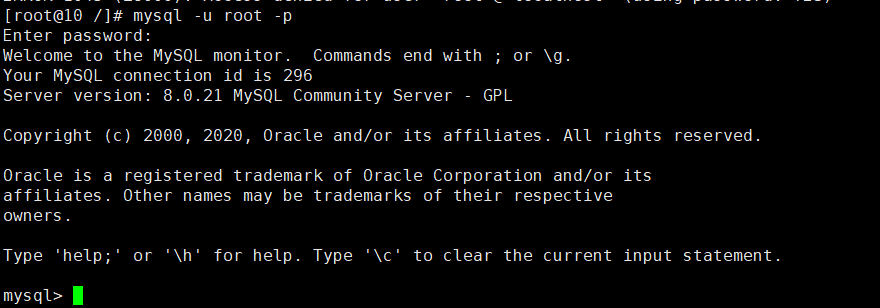
2.1 服务器登录mysql
[root@10 /]# mysql -u root -p

输入你的密码
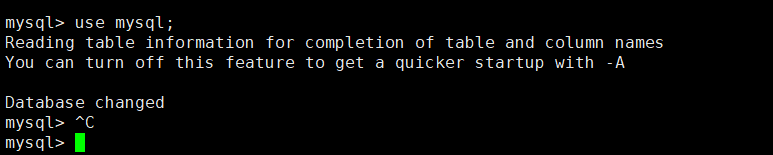
切换到mysql库
mysql> use mysql;
查看用户
mysql> select user,host from user;
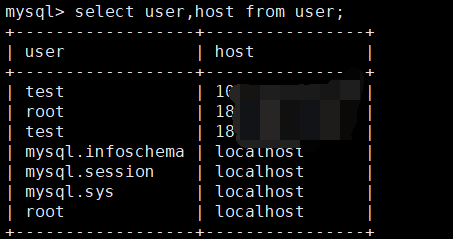
这里可以看到所有用户。
user  host
root  localhost       # 代表只能本机连接,不能远程连接
root  %              # 代表允许所有IP远程连接
root  192.168.66.31         # 代表允许IP:192.168.66.31 远程连接
root  192.168.66.32         # 代表允许IP:192.168.66.32 远程连接
以上已经说明了所有设置登录账户权限的场景;
2.2 允许所有人连接
# 更新host为'%'
UPDATE `user` SET `Host`='%' WHERE `user`='root' AND `Host`='localhost';

# Mysql 8 赋权: *.*代表所有库权限,test.* 代表test库的权限
GRANT ALL ON *.* to 'root'@'%';
 # 更新配置并使之生效 flush privileges;
其他Mysql版本:
# 更新host为'%'
UPDATE `user` SET `Host`='%' WHERE `user`='root' AND `Host`='localhost';

# Mysql5.7 赋权
GRANT ALL PRIVILEGES ON *.* to 'root'@'%' IDENTIFIED by '密码' WITH GRANT OPTION;
 # 更新配置并使之生效 flush privileges;
2.3 允许单个IP登录,赋权全权限
drop user 'test'@'183.195.13.117';

CREATE user 'test'@'183.195.13.117' IDENTIFIED by '你的密码';

GRANT ALL on *.* TO 'test'@'183.195.13.117';
 flush privileges;
2.4 允许单个IP登录,赋权test库权限
drop user 'test'@'183.195.13.117';

CREATE user 'test'@'183.195.13.117' IDENTIFIED by '你的密码';

GRANT ALL on test.* TO 'test'@'183.195.13.117';
 flush privileges;
2.5 允许多个IP登录,赋权test库权限
# 第一个IP

CREATE user 'test'@'183.195.13.117' IDENTIFIED by '你的密码';

GRANT ALL on test.* TO 'test'@'183.195.13.117';
 flush privileges; # 第二个IP CREATE user 'test'@'183.195.13.118' IDENTIFIED by '你的密码'; GRANT ALL on test.* TO 'test'@'183.195.13.118'; flush privileges; # 有几个IP,就创建多少个用户

3、 重置密码
1.在 [/etc/my.cnf]最后加上如下语句 并保持退出文件;
skip-grant-tables

2.重启mysql
service mysql restart
 3.输入以下命令,点击enter键可以跳过密码直接进入mysql mysql -u root -p 4.查看root用户的相关信息 select host, user, authentication_string, plugin from user;可以看到root用户中authentication_string就是你之前的密码的散列值。 5.当前root用户authentication_string字段下有内容,先将其设置为空 use mysql; update user set authentication_string='' where user='root'; 6.使用ALTER修改root用户密码 ALTER user 'root'@'localhost' IDENTIFIED BY '你的新密码'
本文使用 tech.souyunku.com 排版


